

Give You Free Regular Updates on FCSS_SASE_AD-24 Exam Questions Oct 18, 2025
Achieve the FCSS_SASE_AD-24 Exam Best Results with Help from Fortinet Certified Experts
NEW QUESTION # 33
How does FortiSASE's SIA enhance compliance with security policies?
(Select all that apply)
Response:
- A. By providing real-time security updates
- B. By disabling all non-compliant devices
- C. By monitoring and logging all web traffic
- D. By enforcing consistent security policies across all endpoints
Answer: C,D
NEW QUESTION # 34
During FortiSASE provisioning, how many security points of presence (POPs) need to be configured by the FortiSASE administrator?
- A. 0
- B. 1
- C. 2
- D. 3
Answer: A
Explanation:
https://docs.fortinet.com/document/fortisase/latest/administration-guide/751044/appendix-a-fortisase-data- centers#Number
NEW QUESTION # 35
FortiSASE logs can only be used for real-time analysis and do not support historical analysis.
Response:
- A. False
- B. True
Answer: A
NEW QUESTION # 36
Which technology is used with IPsec for spoke-to-spoke connectivity in a Secure Private Access (SPA) with SD-WAN deployment?
- A. OVTEP
- B. EVPN
- C. EBGP
- D. ADVPN
Answer: D
NEW QUESTION # 37
A customer needs to implement device posture checks for their remote endpoints while accessing the protected server. They also want the TCP traffic between the remote endpoints and the protected servers to be processed by FortiGate.
In this scenario, which three setups will achieve the above requirements? (Choose three.)
- A. Configure ZTNA servers and ZTNA policies on FortiGate.
- B. Configure private access policies on FortiSASE with ZTNA.
- C. Sync ZTNA tags from FortiSASE to FortiGate.
- D. Configure ZTNA tags on FortiGate.
- E. Configure FortiGate as a zero trust network access (ZTNA) access proxy.
Answer: A,D,E
Explanation:
To meet the requirements of implementing device posture checks for remote endpoints and ensuring that TCP traffic between the endpoints and protected servers is processed by FortiGate, the following three setups are necessary:
Configure ZTNA tags on FortiGate (Option A):
ZTNA (Zero Trust Network Access) tags are used to define access control policies based on the security posture of devices. By configuring ZTNA tags on FortiGate, administrators can enforce granular access controls, ensuring that only compliant devices can access protected resources.
Configure FortiGate as a zero trust network access (ZTNA) access proxy (Option B):
FortiGate can act as a ZTNA access proxy, which allows it to mediate and secure connections between remote endpoints and protected servers. This setup ensures that all TCP traffic passes through FortiGate, enabling inspection and enforcement of security policies.
Configure ZTNA servers and ZTNA policies on FortiGate (Option C):
To enable ZTNA functionality, administrators must define ZTNA servers (the protected resources) and create ZTNA policies on FortiGate. These policies determine how traffic is routed, inspected, and controlled based on device posture and user identity.
NEW QUESTION # 38
Which two components are part of onboarding a secure web gateway (SWG) endpoint? (Choose two)
- A. FortiSASE CA certificate
- B. FortiSASE invitation code
- C. FortiClient installer
- D. proxy auto-configuration (PAC) file
Answer: A,D
Explanation:
Onboarding a Secure Web Gateway (SWG) endpoint involves several components to ensure secure and effective integration with FortiSASE. Two key components are the FortiSASE CA certificate and the proxy auto-configuration (PAC) file.
* FortiSASE CA Certificate:
* The FortiSASE CA certificate is essential for establishing trust between the endpoint and the FortiSASE infrastructure.
* It ensures that the endpoint can securely communicate with FortiSASE services and inspect SSL
/TLS traffic.
* Proxy Auto-Configuration (PAC) File:
* The PAC file is used to configure the endpoint to direct web traffic through the FortiSASE proxy.
* It provides instructions on how to route traffic, ensuring that all web requests are properly inspected and filtered by FortiSASE.
References:
FortiOS 7.2 Administration Guide: Details on onboarding endpoints and configuring SWG.
FortiSASE 23.2 Documentation: Explains the components required for integrating endpoints with FortiSASE and the process for deploying the CA certificate and PAC file.
NEW QUESTION # 39
Which of the following describes the FortiSASE inline-CASB component?
- A. It provides visibility for unmanaged locations and devices.
- B. It detects data at rest.
- C. It uses API to connect to the cloud applications.
- D. It is placed directly in the traffic path between the endpoint and cloud applications.
Answer: D
Explanation:
The FortiSASE inline-CASB (Cloud Access Security Broker) component is designed to provide real-time security and visibility by being placed directly in the traffic path between the endpoint and cloud applications . Inline-CASB inspects traffic as it flows to and from cloud applications, enabling enforcement of security policies, detection of threats, and prevention of unauthorized access. This approach ensures that all interactions with cloud applications are monitored and controlled in real time.
Here's why the other options are incorrect:
A . It provides visibility for unmanaged locations and devices: While inline-CASB enhances visibility, its primary function is to inspect and secure traffic in real time. Visibility for unmanaged locations and devices is typically achieved through other components like endpoint agents or API-based CASB.
C . It uses API to connect to the cloud applications: API-based CASB is a different approach that relies on APIs provided by cloud applications to monitor and manage data. Inline-CASB operates directly in the traffic flow rather than using APIs.
D . It detects data at rest: Detecting data at rest is typically handled by Data Loss Prevention (DLP) tools or API-based CASB solutions. Inline-CASB focuses on inspecting traffic in motion, not data stored in cloud applications.
Reference:
Fortinet FCSS FortiSASE Documentation - Inline-CASB Overview
FortiSASE Administration Guide - Cloud Application Security
NEW QUESTION # 40
Which two statements describe a zero trust network access (ZTNA) private access use case? (Choose two.)
- A. The security posture of the device is secure.
- B. All FortiSASE user-based deployments are supported.
- C. Data center redundancy is offered.
- D. All TCP-based applications are supported.
Answer: A,D
Explanation:
Zero Trust Network Access (ZTNA) private access use cases focus on providing secure and controlled access to private applications without exposing them to the public internet. The following two statements accurately describe ZTNA private access use cases:
The security posture of the device is secure (Option A):
ZTNA enforces strict access controls based on the principle of least privilege. Before granting access to private applications, ZTNA evaluates the security posture of the device (e.g., whether it is patched, compliant, and free of malware). Only devices that meet the required security standards are granted access, ensuring that the device is secure before allowing private access.
All TCP-based applications are supported (Option C):
ZTNA supports all TCP-based applications, enabling secure access to a wide range of private applications, including legacy systems and custom-built applications. This flexibility makes ZTNA suitable for organizations with diverse application environments.
Here's why the other options are incorrect:
B . All FortiSASE user-based deployments are supported: While FortiSASE supports various deployment scenarios, not all user-based deployments are automatically compatible with ZTNA. Specific configurations and requirements must be met to enable ZTNA functionality.
D . Data center redundancy is offered: Data center redundancy is unrelated to ZTNA private access use cases. Redundancy typically pertains to infrastructure design and failover mechanisms, not access control methodologies like ZTNA.
Reference:
Fortinet FCSS FortiSASE Documentation - ZTNA Private Access Overview
FortiSASE Administration Guide - ZTNA Deployment Best Practices
NEW QUESTION # 41
Which logs should be prioritized for real-time monitoring in FortiSASE?
(Select all that apply)
Response:
- A. Power consumption logs
- B. User authentication logs
- C. Bandwidth usage logs
- D. Security event logs
Answer: B,C,D
NEW QUESTION # 42
A FortiSASE administrator is configuring a Secure Private Access (SPA) solution to share endpoint information with a corporate FortiGate.
Which three configuration actions will achieve this solution? (Choose three.)
- A. Apply the FortiSASE zero trust network access (ZTNA) license on the corporate FortiGate.
- B. Add the FortiGate IP address in the secure private access configuration on FortiSASE.
- C. Use the FortiClient EMS cloud connector on the corporate FortiGate to connect to FortiSASE
- D. Register FortiGate and FortiSASE under the same FortiCloud account.
- E. Authorize the corporate FortiGate on FortiSASE as a ZTNA access proxy.
Answer: C,D,E
Explanation:
Reference:
FortiOS 7.2 Administration Guide: Provides details on configuring Secure Private Access and integrating with FortiGate.
FortiSASE 23.2 Documentation: Explains how to set up and manage connections between FortiSASE and corporate FortiGate.
NEW QUESTION # 43
How can FortiView in FortiSASE be utilized to enhance network security?
Response:
- A. By providing detailed insights into network traffic
- B. By disabling non-compliant devices
- C. By broadcasting security updates
- D. By displaying user activity in real-time
Answer: A
NEW QUESTION # 44
In FortiSASE, what role does the Secure Private Access (SPA) component play?
Response:
- A. Monitors public internet traffic
- B. Provides secure access to private cloud applications
- C. Manages user credentials
- D. Provides load balancing across multiple sites
Answer: B
NEW QUESTION # 45
FortiSASE can only be deployed in cloud environments and does not support on-premises integration.
Response:
- A. False
- B. True
Answer: A
NEW QUESTION # 46
When viewing the daily summary report generated by FortiSASE. the administrator notices that the report contains very little data. What is a possible explanation for this almost empty report?
- A. Digital experience monitoring is not configured.
- B. There are no security profile group applied to all policies.
- C. Log allowed traffic is set to Security Events for all policies.
- D. The web filter security profile is not set to Monitor
Answer: C
Explanation:
If "Log allowed traffic" is set only to "Security Events" for all policies, only specific security events (such as blocked or malicious traffic) are logged, while general allowed traffic is not recorded.
This results in a daily summary report with minimal data, as it lacks logs of most regular traffic. To capture more detailed information, "Log allowed traffic" should be configured to record all traffic types, not just security events.
NEW QUESTION # 47
Which two advantages does FortiSASE bring to businesses with multiple branch offices? (Choose two.)
- A. It eliminates the need to have an on-premises firewall for each branch.
- B. It offers centralized management for simplified administration.
- C. It enables seamless integration with third-party firewalls.
- D. it offers customizable dashboard views for each branch location
Answer: A,B
Explanation:
FortiSASE brings the following advantages to businesses with multiple branch offices:
* Centralized Management for Simplified Administration:
* FortiSASE provides a centralized management platform that allows administrators to manage security policies, configurations, and monitoring from a single interface.
* This simplifies the administration and reduces the complexity of managing multiple branch offices.
* Eliminates the Need for On-Premises Firewalls:
* FortiSASE enables secure access to the internet and cloud applications without requiring dedicated on-premises firewalls at each branch office.
* This reduces hardware costs and simplifies network architecture, as security functions are handled by the cloud-based FortiSASE solution.
References:
FortiOS 7.2 Administration Guide: Provides information on the benefits of centralized management and cloud- based security solutions.
FortiSASE 23.2 Documentation: Explains the advantages of using FortiSASE for businesses with multiple branch offices, including reduced need for on-premises firewalls.
NEW QUESTION # 48
Which onboarding method is most effective for securely integrating a large number of remote users into FortiSASE?
Response:
- A. Temporary guest accounts with limited access
- B. Open registration allowing user self-enrollment
- C. Individual user registration via email invitations
- D. Bulk user registration through automated scripts
Answer: D
NEW QUESTION # 49
Which two deployment methods are used to connect a FortiExtender as a FortiSASE LAN extension? (Choose two.)
- A. Configure an IPsec tunnel on FortiSASE to connect to FortiExtender.
- B. Connect FortiExtender to FortiSASE using FortiZTP
- C. Enable Control and Provisioning Wireless Access Points (CAPWAP) access on the FortiSASE portal.
- D. Enter the FortiSASE domain name in the FortiExtender GUI as a static discovery server
Answer: B,D
Explanation:
There are two deployment methods used to connect a FortiExtender as a FortiSASE LAN extension:
Connect FortiExtender to FortiSASE using FortiZTP:
FortiZero Touch Provisioning (FortiZTP) simplifies the deployment process by allowing FortiExtender to automatically connect and configure itself with FortiSASE. This method requires minimal manual configuration, making it efficient for large-scale deployments.
Enter the FortiSASE domain name in the FortiExtender GUI as a static discovery server:
Manually configuring the FortiSASE domain name in the FortiExtender GUI allows the extender to discover and connect to the FortiSASE infrastructure.
This static discovery method ensures that FortiExtender can establish a connection with FortiSASE using the provided domain name.
NEW QUESTION # 50
What information is crucial for generating security reports in FortiSASE?
Response:
- A. Employee attendance records
- B. Device serial numbers
- C. User browsing history
- D. Peak usage times and potential security breaches
Answer: D
NEW QUESTION # 51
Which dedicated IP address use case allows application of SNAT to specific incoming remote users based on user, group, or country?
Response:
- A. Identification and isolation
- B. Geolocation rules
- C. Source IP anchoring
- D. Central SNAT policy
Answer: C
NEW QUESTION # 52
Refer to the exhibits.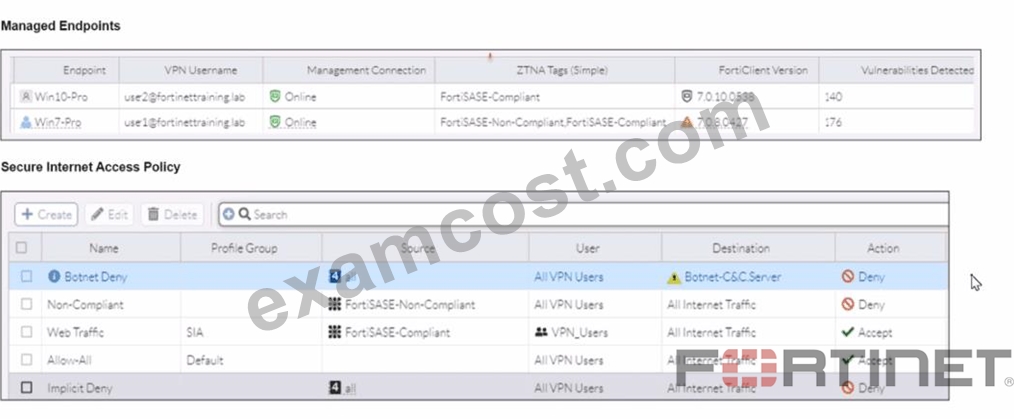
WiMO-Pro and Win7-Pro are endpoints from the same remote location. WiMO-Pro can access the internet though FortiSASE, while Wm7-Pro can no longer access the internet Given the exhibits, which reason explains the outage on Wm7-Pro?
- A. Win-7 Pro has exceeded the total vulnerability detected threshold.
- B. The Win7-Pro FortiClient version does not match the FortiSASE endpoint requirement.
- C. Win7-Pro cannot reach the FortiSASE SSL VPN gateway
- D. The Win7-Pro device posture has changed.
Answer: D
Explanation:
Based on the provided exhibits, the reason why the Win7-Pro endpoint can no longer access the internet through FortiSASE is due to exceeding the total vulnerability detected threshold. This threshold is used to determine if a device is compliant with the security requirements to access the network.
Endpoint Compliance:
FortiSASE monitors endpoint compliance by assessing various security parameters, including the number of vulnerabilities detected on the device.
The compliance status is indicated by the ZTNA tags and the vulnerabilities detected.
Vulnerability Threshold:
The exhibit shows that Win7-Pro has 176 vulnerabilities detected, whereas Win10-Pro has 140 vulnerabilities.
If the endpoint exceeds a predefined vulnerability threshold, it may be restricted from accessing the network to ensure overall network security.
Impact on Network Access:
Since Win7-Pro has exceeded the vulnerability threshold, it is marked as non-compliant and subsequently loses internet access through FortiSASE.
The FortiSASE endpoint profile enforces this compliance check to prevent potentially vulnerable devices from accessing the internet.
Reference:
FortiOS 7.2 Administration Guide: Provides information on endpoint compliance and vulnerability management.
FortiSASE 23.2 Documentation: Explains how vulnerability thresholds are used to determine endpoint compliance and access control.
NEW QUESTION # 53
......
Fortinet FCSS_SASE_AD-24 Exam Syllabus Topics:
| Topic | Details |
|---|---|
| Topic 1 |
|
| Topic 2 |
|
| Topic 3 |
|
| Topic 4 |
|
Detailed New FCSS_SASE_AD-24 Exam Questions for Concept Clearance: https://www.examcost.com/FCSS_SASE_AD-24-practice-exam.html
Provide FCSS_SASE_AD-24 Practice Test Engine for Preparation: https://drive.google.com/open?id=1_hh_RLt0DgBRntmryMJTYpz5xSW0gjRH
